> For the complete documentation index, see [llms.txt](https://docs.unlimited.trade/llms.txt). Markdown versions of documentation pages are available by appending `.md` to page URLs; this page is available as [Markdown](https://docs.unlimited.trade/start-trading/or-unlimited-leverage-guide/orders.md).
# Orders
**Orders are positions waiting to be opened.**
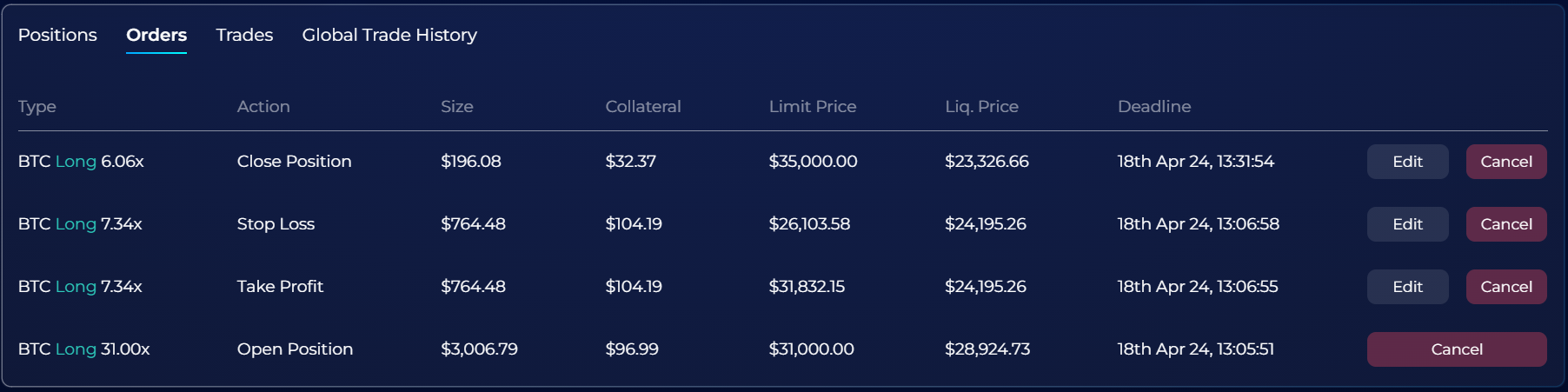
{% hint style="info" %} **Glossary for the image above:** :arrow\_heading\_down:
**Type -** This shows the currency you are trading, whether it's a long or short position and the leverage you used.
**Action -** Displays the current action waiting to take effect.
**Size -** The current total position value of the trade.
**Collateral -** This is the amount of USD you have put up, which may be lost in a liquidation.
**Limit Price -** This shows the price at which the trade will execute
**Liq. Price -** This is the price at which your trade will automatically be closed or "liquidated."
**Deadline -** This indicates the expiry time of the order.
**Edit -** This allows you edit the current order before it takes effect.
**Cancel -** This allows you to cancel the order before it takes effect.
{% endhint %}